How to Wash Mousepad: 5 Safe Steps at Home
Step-by-Step Guide to Cleaning Cloth, RGB, and Hard Desk Mats Safely

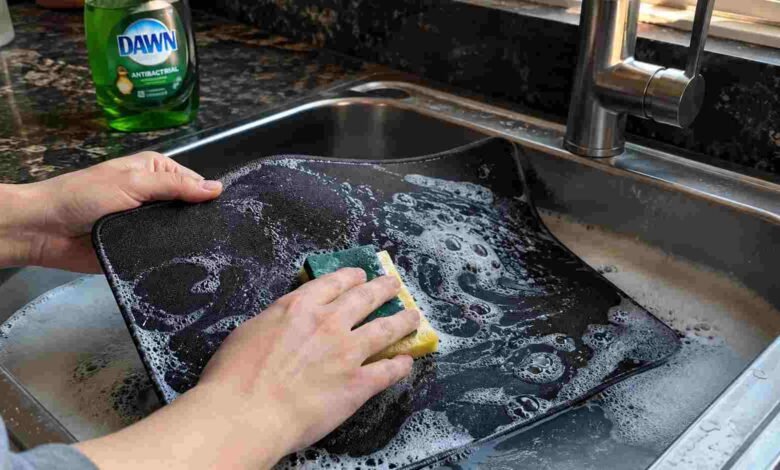
Your desk mat absorbs sweat, dead skin cells, and spilled coffee every single day. If you are wondering how to wash mousepad surfaces safely, the process is actually very simple. Most standard cloth pads only require warm water, mild dish soap, and a soft sponge. Hard plastic and RGB versions require different care to avoid permanent electrical damage.
To wash a standard cloth mousepad, soak it in warm water with a few drops of mild dish soap. Scrub the surface gently with a soft sponge to lift dirt. Rinse it thoroughly under cold water until no soap remains, then let it air dry completely for 24 hours before use.
Key Takeaways
-
Always check your specific manufacturer instructions first.
-
Never use hot water because it melts the rubber base adhesive.
-
Keep your pad out of the washing machine or tumble dryer.
-
RGB components must never be submerged in water.
-
Allow the pad to air dry for at least 24 hours in a shaded spot.
Material Matters: Know Your Mousepad Surface First
Before you start scrubbing, you need to identify what type of mat you own. When learning how to wash mousepad materials properly, you will find that different surfaces react poorly to certain cleaning methods.
Step-by-Step Guide: How to Wash Mousepad Safely
If you have a standard cloth pad, these five steps will safely remove grime and restore that smooth glide.
1. Prepare the Bath Fill your sink or a large basin with warm water. Make sure the water is warm, not hot. Hot water easily damages the glue holding the cloth top to the rubber base.
2. Add Mild Detergent Add a small squirt of mild dish soap into the water. Dish soap is excellent for breaking down the oils from your hands and wrists. Avoid using heavy laundry detergents or bleach.
3. Scrub Gently Place the pad into the soapy water. Using a soft sponge or a very soft bristle brush, lightly scrub the entire surface. Pay extra attention to the areas where your wrist usually rests. Apply light pressure to avoid fraying the stitched edges.
4. Rinse Thoroughly Drain the soapy water and rinse the pad under clean, cold running water. Keep rinsing until the water runs completely clear and no soap bubbles remain. Leftover soap leaves a sticky residue that ruins mouse tracking.
5. Air Dry Completely Pat the pad down with a clean, dry towel to remove excess moisture. Lay it flat in a well-ventilated, shaded area. Let it dry for at least 24 to 36 hours.
Special Care for Cleaning RGB Desk Mats
RGB desk mats require extreme caution. Because they contain electronic lighting tubes and a power connector, you cannot submerge them.
Unplug the mat from your computer. Take a microfiber cloth, dip it in warm soapy water, and wring it out until it is barely damp. Gently wipe the cloth surface, staying far away from the power module. Let it air dry flat. For more specific electronic care, checking Official Manufacturer Cleaning Guidelines is always a smart idea to keep your warranty intact.
Common Mousepad Cleaning Mistakes to Avoid
Many people ruin their expensive gear by making simple mistakes.
The most common error is tossing a cloth pad into the washing machine. While a few brands say this is fine on a delicate cycle, the heavy spinning often destroys the rubber base and ruins the flat shape.
Another major mistake is using a hair dryer or placing the pad in direct sunlight to speed up the drying process. Direct heat warps the rubber and fades the printed designs. Always choose patience over speed.
Conclusion: Enjoy Your Clean Mousepad
Keeping your desk space clean improves your setup and extends the life of your gear. Now that you know exactly how to wash mousepad accessories safely, you can easily restore your items using mild soap, warm water, and a little patience.
Next Steps:
-
Check your specific brand’s website for any unique warranty warnings.
-
Gather mild dish soap and a clean sponge.
-
Set aside a weekend to wash the pad so it has plenty of time to dry before your next workday.
FAQs
Can I put my mousepad in the washing machine?
Most manufacturers advise against using a washing machine. The harsh spinning and heavy detergents can degrade the rubber backing and cause the edges to fray. Hand washing is much safer.
How long does a clean mousepad take to dry?
A standard cloth pad usually takes 24 to 36 hours to air dry completely. It must be completely dry before you place it back on your wooden or glass desk to prevent moisture damage.
Why is my mousepad sticky after washing?
If your pad feels sticky, you likely left soap residue in the fabric. You need to rinse it again under cold water until the water runs completely clear.
Can I use a hair dryer to dry my desk mat?
No, you should never use a hair dryer. The concentrated heat easily melts the rubber base and warps the flat surface, rendering the pad unusable.
How often should I clean my mousepad?
For heavy daily use, washing it every two to three months is ideal. Spot cleaning with a damp cloth every few weeks helps maintain a smooth surface between deep washes.